

Description
Dark Blue Space Sunset Chrome Theme
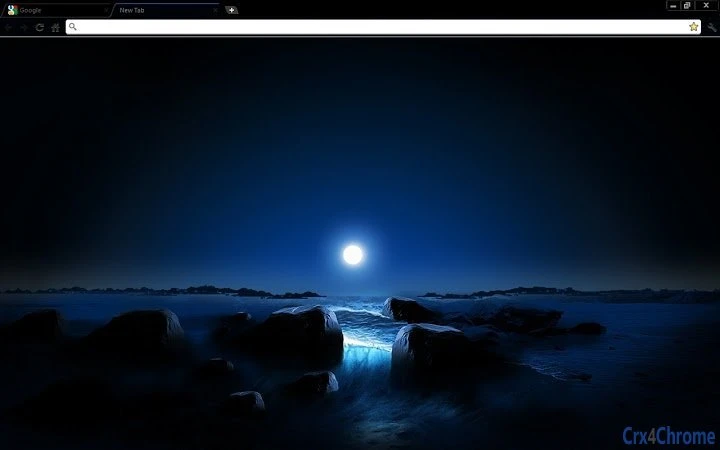
The Dark Blue Space Sunset Chrome Theme is a visually immersive browser extension designed for users seeking a refined dark mode experience within Google Chrome. Tailored for individuals who spend extended hours browsing, it minimizes eye strain by using a deep black base with a calming blue space sunset gradient. This theme is ideal for night-time browsing, creative professionals, and anyone who values a sleek, distraction-free interface. The developer has focused on aesthetic cohesion, offering a minimalist design with a subtle blue highlight on the active tab for improved navigation. While primarily a visual enhancement, it supports a more comfortable browsing environment, particularly in low-light settings. Real-world use cases include late-night research, content creation, and long web sessions where visual fatigue is a concern. The theme is part of a broader series of customizable Chrome themes, each catering to different visual preferences.
Key Features & Capabilities
- Immersive Dark Background – Features a deep black canvas with a dynamic blue space sunset gradient, creating a visually engaging backdrop that enhances focus during extended browsing sessions.
- Subtle Blue Tab Indicator – A thin blue line appears at the top of the active tab, offering clear visual feedback without disrupting the dark aesthetic.
- Minimalist Design Language – Eliminates clutter with no visible branding or text elements, ensuring a clean and professional interface.
- Consistent Cross-Platform Appearance – Maintains visual integrity across Windows and Mac operating systems, providing a uniform experience regardless of device.
- Effortless Integration with Chrome – Installs directly through the Chrome Web Store, requiring no complex setup or configuration.
Users can apply this theme to transform their browsing environment into a serene, low-contrast space ideal for creative work or late-night reading. The absence of distracting elements allows for better concentration, while the gradient background adds depth without overwhelming the user. This theme is especially effective when used with other dark-themed extensions or tools, enhancing overall visual harmony.
User Interface, Workflow & Performance
The user interface is entirely governed by Google Chrome’s native theme engine, meaning the experience is consistent with Chrome’s standard behavior. Navigation remains unchanged, with all browser controls—address bar, bookmarks, tabs—preserved in their original layout. The theme modifies only the background and tab styling, leaving functionality intact. The workflow is streamlined, requiring just one click to apply from the Chrome Web Store. No additional configuration is needed. Performance is minimal, as the theme operates as a lightweight visual layer without affecting browser speed or resource consumption. The developer did not specify resource usage details, but typical behavior for such themes suggests negligible impact on CPU or RAM. Stability is expected to be high, as Chrome themes are sandboxed and do not interfere with core browser operations. No known conflicts with other extensions were reported.
Compatibility & System Requirements
Compatible with both Windows and Mac operating systems, the theme supports the latest versions of Google Chrome on these platforms. The installation size is 1.2 MB, which is typical for Chrome themes. Exact system requirements were not listed, but since it is a browser extension, it relies on Chrome’s built-in rendering engine. No additional hardware specifications are required beyond what is standard for running Google Chrome. The developer did not provide detailed compatibility notes for older Chrome versions, so users are advised to ensure their browser is up to date. Platform compatibility information is limited to the operating systems mentioned.
Pros and Cons
Pros
- Visually striking dark blue space sunset gradient enhances browsing comfort
- Minimalist design reduces visual clutter and improves focus
- Lightweight at 1.2 MB with no performance impact
- Available for both Windows and Mac users
- Free to download and use with no hidden costs
Cons
- No advanced customization options beyond the default theme
- Dependent on Google Chrome’s theme system; not available for other browsers
- Does not include additional functionality beyond visual styling
- Updates are managed automatically through Chrome, which may limit user control
- Some users may find the blue accent too subtle for quick tab identification
FAQ Section
Is this theme compatible with my version of Chrome?
The theme is designed for the latest versions of Google Chrome. Users should ensure their browser is updated to the most recent release for optimal compatibility.
Can I use this theme on browsers other than Chrome?
No, this theme is exclusive to Google Chrome and cannot be installed on other browsers such as Firefox, Edge, or Safari.
Is the theme safe to install?
Yes, the theme is distributed through the official Chrome Web Store and adheres to Google’s security policies. It does not collect personal data or alter browser behavior beyond visual changes.
How do I update the theme?
Updates are handled automatically by Google Chrome. When a new version is released, the theme will be updated in the background without user intervention.
Can I customize the colors or background?
Currently, the theme does not offer user-defined customization options. All visual elements are fixed as designed by the developer.
Final Thoughts
The Dark Blue Space Sunset Chrome Theme delivers a polished, immersive experience for users who prioritize aesthetics and eye comfort during long browsing sessions. Its minimalist design, subtle blue tab indicator, and calming gradient make it a standout choice among dark mode themes. While it offers no functional enhancements beyond visual appeal, its lightweight nature and seamless integration with Chrome ensure it remains a reliable and efficient addition to any user’s browser. The theme is particularly well-suited for creative professionals, night owls, and those who value a distraction-free digital environment. With a clean, modern look and a commitment to simplicity, it stands out in a crowded market of browser themes. Download Dark Blue Space Sunset Chrome Theme now.
Guides & Tutorials for Blue Space Sunset Chrome Theme Theme for Chrome
How to install Blue Space Sunset Chrome Theme Theme for Chrome
- Click the Preview / Download button above.
- Once redirected, accept the terms and click Install.
- Wait for the Blue Space Sunset Chrome Theme Theme for Chrome download to finish on your device.
How to use Blue Space Sunset Chrome Theme Theme for Chrome
This software is primarily used for its core features described above. Open the app after installation to explore its capabilities.
User Reviews for Blue Space Sunset Chrome Theme Theme for Chrome 0
No reviews found





